


How To See Watch History On Instagram?
Instagram, launched by Meta Platforms Inc., has grown to over 2 billion active users worldwide and offers dynamic features for creators and viewers. Learning how to see watch history on Instagram helps users track their watched Reels and videos efficiently. By accessing your profile, menu, and settings, you can explore “Your Activity” and review chronological watch history.
This feature enhances content discovery, engagement, and personalized recommendations. Understanding how to see watch history on Instagram also reveals insights into the algorithm that drives over 50% daily Reel interactions, shaping user experience and the platform’s legacy as a data-driven social media giant.
| Basics | Summary |
| Open App | Launch Instagram on your phone. |
| Profile | Tap 👤 to access your account. |
| Update | Keep the app updated for new tools. |
| Menu | Tap ☰ for quick options. |
| Navigation | Menus speed up feature access. |
| Settings | Go to ⚙️ to manage the account. |
| Meta | Owned by Meta, a data-driven app. |
| Your Activity | Tap 🕒 to view activity logs. |
| Track Time | Check time and usage stats. |
| Watch History | View recently watched videos. |
| Revisit | Rewatch the Reels you liked. |
| Manage | Tap ⋮ to delete videos. |
| Save | Use 🔖 or ❤️ to mark favorites. |
| Algorithm | Watch habits shape your Explore feed. |
How To See Watch History On Instagram? A Follow-Up Process
Open Instagram and Go to Your Profile

Start by launching the Instagram app on your smartphone. Tap the profile icon (👤) at the bottom right corner. This takes you to your personal profile, where you can access all account features. Make sure your app is up to date, as Instagram frequently rolls out new tools. Regular updates improve security and enable access to features such as Watch History and content analytics.
Access the Menu Options

On your profile page, tap the menu symbol (☰) at the top right. The menu provides shortcuts to settings, saved content, and activity logs. From here, you can access various features such as Insights for creators, Saved items, and Your Activity. Using this menu ensures you don’t miss hidden options. Instagram reports over 2 billion active users, so these menus are optimized for fast navigation and user efficiency.
Enter ‘Settings’
After opening the menu, select Settings (⚙️). This section controls privacy, notifications, and account management features. Settings let you control how your data is used, including tracking your activity and your watch history. Instagram is owned by Meta Platforms Inc., a company that generates over $120 billion annually and emphasizes data-driven features. By accessing Settings, you prepare to locate and manage your watch history efficiently.
Go to ‘Your Activity’
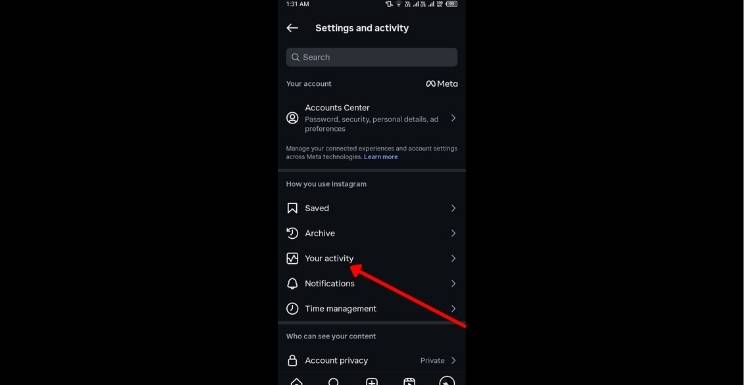
Inside Settings, tap Your Activity (🕒). This feature tracks time spent on Instagram, likes, comments, and videos you’ve watched. Here, you can understand usage patterns and review past interactions. Instagram’s algorithm uses this data to improve personalized recommendations. Being aware of Your Activity helps you manage screen time, discover content faster, and locate previously watched Reels or videos without extensive searching on the platform.
View ‘Watch History’
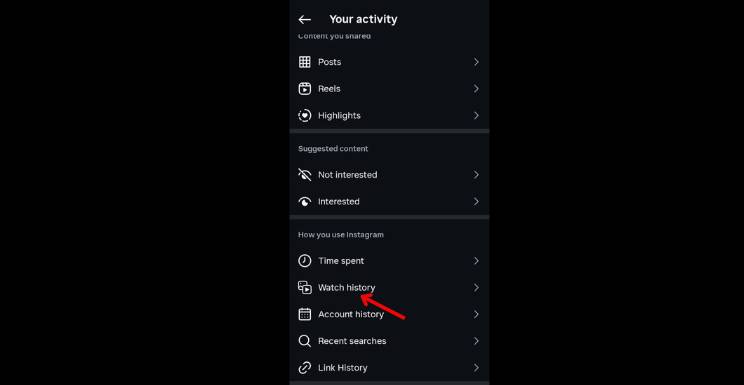
In Your Activity, tap Watch History. This section displays a chronological list of Reels and videos you’ve watched recently. You can revisit content you liked or missed. Instagram limits this feature to recent videos, ensuring quick access to relevant content. This is especially helpful for users who consume multiple Reels daily, enabling seamless re-engagement without endless scrolling and saving time and effort on content retrieval.
Manage and Curate Watch History
To manage watch history, scroll through videos and tap the three dots (⋮) next to any entry to remove it. This helps customize your history and keeps recommendations relevant. Managing history improves user experience by allowing better content discovery. For creators, this insight can guide content strategies. Instagram reports that over 50% of users engage with Reels daily.
Why Instagram Doesn’t Show Full Watch History and What You Can Do?
Many users wonder how to see watch history on Instagram completely, but Instagram intentionally limits access to protect privacy. The app only shows recent Reels and videos, not a complete history log. This design reduces data overload and secures user information. To track content manually, users can save or like videos. Using saved collections helps recreate a personalized viewing history for easy future access.
Best Tips to Manage and Organize Your Watch Activity
- Knowing how to see watch history on Instagram helps you organize content you’ve already viewed.
- Save your favorite Reels 🔖, or like ❤️ them to create quick access lists.
- Regularly reviewing your “Your Activity” section also improves content discovery.
- Keeping a clean and curated watch record ensures Instagram’s algorithm recommends videos you genuinely enjoy, leading to a more tailored.
Instagram’s Algorithm
Learning how to see watch history on Instagram offers insight into how its algorithm works. The platform suggests videos based on what you previously watched or liked. The more you interact with similar content, the more accurate your feed becomes. By understanding your viewing patterns, you can influence what appears on your Explore tab, improving the relevance of posts and helping you discover content that matches your true interests.
Importance of Watch History in Improving Instagram Personalization
An important aspect of Instagram’s watch history feature is how it directly contributes to content personalization and user engagement. Every reel or video a user watches becomes part of the platform’s behavioral data, which is then analyzed by Instagram’s algorithm to refine recommendations on the Explore page and Reels feed.
This means that even short viewing interactions can influence the type of content a user sees in the future. While Instagram does not provide a full, permanent watch history, the recorded activity helps the system understand user interests more accurately over time. As a result, users experience a more tailored feed, where content aligns closely with their preferences, viewing habits, and engagement patterns, making the platform more interactive and addictive.
Conclusion
Mastering how to see watch history on Instagram allows users to revisit previously watched content, manage preferences, and enhance personalized recommendations. By regularly checking “Your Activity” and curating videos, you improve engagement and content discovery. Understanding watch patterns not only saves time but also provides insight into Instagram’s algorithm, ensuring a tailored browsing experience. Proper use of this feature effectively strengthens interaction, enjoyment, and control over your Instagram activity.
Want to know about Alienware X14 Slim Gaming Laptop Review: Specs, Gaming Performance, Battery Test, Heat Management, Price Comparison, and Setup Tips for Maximum FPS Check out our Tech category.
FAQs
Open Instagram, go to your profile, tap the menu, select Settings, then Your Activity, and finally access Watch history to view videos you recently watched.
Tap the three dots next to any video in Watch history to delete entries. Curating your history helps improve feed recommendations and content discovery.
Instagram automatically logs your watched videos in Your Activity. This helps personalize your feed, suggesting content similar to what you regularly engage with.